The calm custody calendar

Whose night is it? Always know.

One childhood, two homes, zero guessing. WhoseNight answers tonight, builds any schedule in seconds, and quietly keeps both homes on the same page.

Free on the App Store for iPhone and iPad. Android is in the works. Join the tester list to get in first.

Free for one parent No account needed Private by design
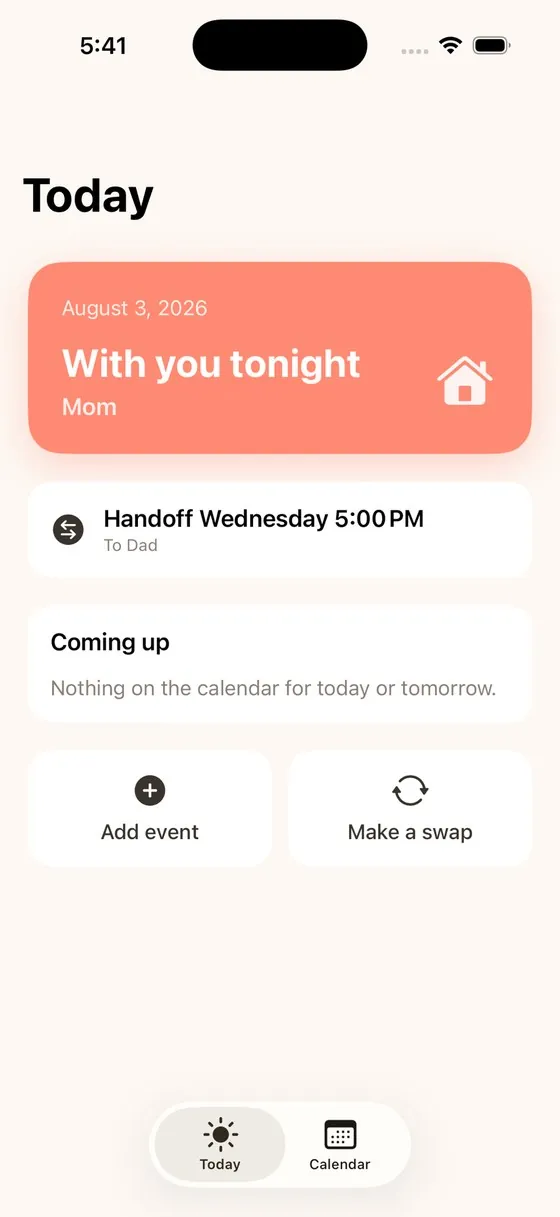
The WhoseNight Today screen showing With you tonight, Mom, and the next handoff on Wednesday at 5 PM

The group chat was never a calendar

Most co-parents are not building a court case. They are running one childhood across two homes, and the tools they inherited were never built for it.

A dead shared calendar nobody updates. A whiteboard on the fridge. And the Wednesday text you both send at the same time: wait, is she with you tonight?

  • × A group chat that scrolls the schedule away
  • × A shared calendar that goes stale in a week
  • × Custody apps that feel like evidence software
  • × Doing handoff math in your head, every day
How it works

Set it up in ten seconds. Then stop thinking about it.

Pick the rhythm your family already uses. The whole calendar builds itself, and the answer lives on your home screen.

Choosing a custody rhythm in the WhoseNight setup
1

Pick your rhythm

Week on week off, 2-2-3, 2-2-5-5, 3-4-4-3, every other weekend, or fully custom. Every kid can run their own.

The color-coded month calendar, coral and teal by household
2

The calendar builds itself

Every night is color-coded by home, months ahead. Swaps and one-off changes never break the underlying pattern.

The WhoseNight widget on a phone home screen
3

The widget just tells you

With you tonight. Handoff Friday at 5:00 PM. Right on your home screen, no app to open, no math to do.

Everything the schedule needs

Nothing it doesn't

No tone monitoring. No court exports. No charging each parent separately to see the same calendar.

Any schedule, per kid

Long rotating patterns, different schedules for different kids, all supported without a spreadsheet in sight.

Swaps that hold

Move one night without redrawing the whole month. The pattern underneath stays exactly where it was.

Holidays, handled

Thanksgiving, spring break, birthdays. Set them once and they override the rotation only where they should.

Reminders that fire

A quiet nudge before every handoff, so nobody is scrambling at 5:00 on a Friday.

A Kid Mode of their own

A read-only view a child can open to count sleeps until the other house. Reassurance they can hold themselves.

Private by design

Your family's schedule lives on your phone. No ads, no trackers, no selling your data. Ever.

The other home

They just open their own calendar

Turn on the live shared calendar and the schedule appears right inside the other parent's Google or Apple calendar. No app to install. No account to make. Always current.

  • A private link, or a live feed into their calendar app
  • Updates the moment you change a night
  • Turn it off and it disappears from their side instantly
The live shared WhoseNight calendar page the other home can open in any browser
When it gets complicated

One home, two kids, two schedules

Real families are not tidy. When each child is on a different rotation, WhoseNight shows tonight for each of them at a glance, and keeps every calendar straight without turning your night into data entry.

  • A separate schedule for every kid
  • Tonight, per child, on one clean screen
  • Long rotating patterns fully supported
The Today screen showing different children on different schedules
Free guides

Not sure which schedule fits?

Plain-language breakdowns of every common custody schedule. How each one works, who it tends to fit, and a full calendar example. No legal jargon anywhere.

Every family

Built for how your family is actually shaped

The two homes are just color. Whoever lives in them is up to you.

Mom & DadMom & MomDad & DadBlendedGrandparentsEvery kid different
Simple, honest pricing

One plan for the whole family

No per-parent pricing, ever. The core app is free forever.

Solo

Free forever

Fully useful with one parent and one phone. No account required.

  • Every schedule, including per kid
  • Home screen widget
  • Handoff reminders
Covers everyone

WhoseNight Family

$19.99 / year

Or $2.99 a month. One purchase covers both homes and every caregiver. The other parent never pays.

  • Live shared calendar for the other home
  • The whole family, one price
  • Cancel anytime

No ads. No data selling. No per-parent pricing. Not now, not ever.

Whose night is it? Always know.

The calm custody calendar for two homes.

Free on the App Store for iPhone and iPad. Android beta coming soon.